


A sudden power outage in the middle of an important task can quickly disrupt your workday. Many people working from home in Luzon and the Visayas now face more frequent brownouts, making it harder to stay connected, meet deadlines, and get work done, which is why a coworking space in the Philippines offers a more reliable and productive alternative.
Rotational brownouts in the Philippines have recently affected Metro Manila and nearby provinces due to power supply issues in several areas. This article offers practical tips to help remote workers stay productive, prepared, and connected during brownouts.
Why Brownouts Keep Happening
Brownouts usually happen when electricity demand rises and puts extra pressure on the power supply. The grid is at risk during times of high use, like in the hotter months.
- Power generation may not meet peak demand if plants are under maintenance, face unexpected outages, or run at lower capacity.
- To avoid a larger grid failure, the National Grid Corporation of the Philippines (NGCP) sometimes uses Manual Load Dropping. This leads to rotating outages that usually last two to three hours.
- Commonly affected areas include Metro Manila, Bulacan, Cavite, Laguna, Pampanga, Quezon, and Rizal.
For people working from home, these disruptions are a regular seasonal challenge that can impact remote work productivity, internet connection, and business operations.
What to Do the Moment Power Goes Out
If a brownout happens, quick action can help you avoid major disruptions and work interruptions while keeping your workday running smoothly. A simple plan also makes it easier to stay productive and connected.
- Save your work right away and close your applications to prevent losing files or any unsaved changes.
- Switch to mobile data or use a pocket WiFi backup so you can keep working online and stay in touch.
- Let your team, manager, or clients know right away so they can adjust plans or deadlines if needed.
- Check your utility provider’s outage updates or brownout schedule to find out when power might be back and plan your next steps from there.
How to Protect Your Work and Devices
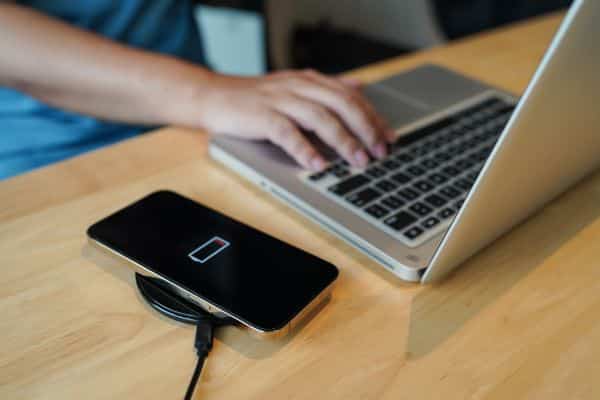
Getting ready for power outages can help you avoid losing work and keep your devices safe. Taking a few simple steps in advance can really help if the power goes out without warning.
- Consider getting a UPS (Uninterruptible Power Supply) so you have enough backup power to save your files and shut down your devices safely.
- Turn on auto-save and use cloud services like Google Drive, OneDrive, or Dropbox to lower the chance of losing your data.
- Make sure your power banks are fully charged so you can keep your phone, laptop, and other important devices running.
- Plug your equipment into a surge protector to keep it safe from voltage spikes when the power returns.
How to Stay Productive During the Outage
Staying productive during a power outage is easier if you plan and stay flexible. Changing how you work can really help.
- Work on offline tasks such as brainstorming, scheduling, or reviewing documents that do not require an internet connection.
- Use your phone’s hotspot only when you really need it. This way, you can save battery for important messages and updates.
- Plan for power outages ahead of time. That way, you will know what to do if one happens unexpectedly.
When Home Is No Longer an Option
Sometimes, working from home during a brownout just isn’t possible, especially when it lasts longer than your backup power and starts to hurt your work productivity. This can happen if the outage goes on after your batteries run out, or if you have urgent deadlines, client meetings, or presentations to give. The heat without air conditioning can also make it hard to concentrate. In these situations, you need stable power and the best backup internet for home right away to keep working well.
Why a Coworking Space Is the Smartest Backup Plan
If brownouts interrupt your work-from-home routine, it helps to have a dependable backup. Coworking spaces offer a practical solution, especially for professionals who need to avoid losing valuable work time.
Coworking spaces have stable power with generator backup, so you can keep working even during long outages. Their fast, reliable internet does not rely on your home connection, so your tasks and communication stay on track. The air-conditioned, comfortable setting also helps you stay focused, even on the hottest days.
Flexible day passes let you use a fully equipped workspace only when you need it, with no long-term commitment. This makes coworking a smart and efficient choice.
How M Spaces Keeps You Working No Matter What
If brownouts interrupt your work-from-home routine, it helps to have a backup plan. Coworking spaces offer a practical solution, especially for professionals who need to avoid losing valuable work time.
Coworking spaces have stable power with generator backup, so you can keep working even during long outages. They also offer fast, reliable internet that does not rely on your home connection. Plus, the air-conditioned environment helps you stay focused, even on the hottest days.
With flexible day passes, you can use a fully equipped workspace only when you need it. There is no need for a long-term commitment, making this a smart and efficient choice.
Reliable Workspace in Metro Manila
Brownouts are common in the Philippines, but you can choose how to handle them. Having a clear plan for power interruptions helps you stay prepared and keep your day on track.
A reliable workspace helps you stay productive when your home setup falls short. M Spaces provides the stable internet, comfort, and support remote workers need during brownouts.
To find out more, reach out at https://www.facebook.com/mspacesph. You can also call +63 967 521 2824, (+632) 5328-5300, or email info@mspacesph.com.


